CLI  

Manage data with LaminDB instances.
How do I enable shell autocompletion?
On MacOS, enable shell autocompletion by adding the following to your ~/.zshrc:
autoload -Uz compinit && compinit
eval "$(_LAMIN_COMPLETE=zsh_source lamin)"
Configure your environment
connect
Set the default database for this directory.
This command updates your local configuration to target the specified instance: all subsequent CLI commands and Python/R sessions will auto-connect to this instance.
You can pass a slug (account/name) or URL (https://lamin.ai/account/name).
Pass --use-proxy-db to connect through the database proxy specified in the hub.
# set a default database for the current directory (recommended)
lamin connect laminlabs/cellxgene --here
# set a default database for the entire home directory
lamin connect laminlabs/cellxgene
# use a URL instead of a slug
lamin connect https://lamin.ai/laminlabs/cellxgene
# connect through the database proxy specified in the hub
lamin connect laminlabs/cellxgene --use-proxy-db
Options:
lamin connect [OPTIONS] INSTANCE

Options:
  --here          Connect in the current directory without changing the global
                  default instance.
  --use-proxy-db  Use the proxy database connection specified in the hub.
  --help          Show this message and exit.
→ Python/R alternative: create a database object via DB or set the default database of your Python/R session via connect()
info
Show info about the database, branch, space, and user.
Manage settings via lamin settings.
Options:
lamin info [OPTIONS]

Options:
  --schema  View database schema via Django plugin.
  --help    Show this message and exit.
→ Python/R alternative: settings()
init
Initialize a database in the current directory.
Create a new development directory for your source code and cd into it:
mkdir mydata && cd mydata
Initialize a local SQLite database in that directory:
lamin init
lamin init --modules bionty
lamin init --modules bionty,pertdb
Initialize a SQLite database that’s hosted on S3 along with all files managed by the LaminDB instance:
lamin init --storage s3://my-bucket
lamin init --storage gs://my-bucket
Initialize a PostgresSQL database with a storage location on S3:
lamin init --storage s3://my-bucket --db "postgresql://user:password@host:port/database"
Options:
lamin init [OPTIONS]

Options:
  --storage TEXT  A local or remote folder (`'s3://...'` or `'gs://...'`).
                  Defaults to `./storage`.
  --name TEXT     Instance name. If no storage location is passed, uses the
                  current working directory name (like git). Otherwise uses
                  the name of the storage location.
  --db TEXT       PostgreSQL connection URI. Defaults to `None`, which implies
                  an SQLite file in the storage location.
  --modules TEXT  Comma-separated string of schema modules.
  --help          Show this message and exit.
→ Python/R alternative: init()
disconnect
Unset the default database for this directory.
With
--here, it clears the default database for the current directory.Without
--here, it clears the default database for the entire home directory.
For example:
lamin disconnect --here
lamin disconnect
Options:
lamin disconnect [OPTIONS]

Options:
  --here  Disconnect local directory context without changing the global
          default instance.
  --help  Show this message and exit.
→ Python/R alternative: disconnect()
Save, load, create & delete
save
Save a file or folder as an artifact, transform, record, or project.
Save a dataset or model as Artifact:
lamin save my_table.csv --key my_tables/my_table.csv
Pass --batch-size to control parallel file transfers when saving artifact folders (default 128). Reducing to 20 or lower can help with network errors:
lamin save my_folder --key my_tables --batch-size 20
Pass --store-kwargs as a JSON object for fine-grained upload settings (normally not needed):
lamin save my_table.csv --key my_tables/my_table.csv --store-kwargs '{"chunksize": 1000000}'
Save source code as Transform:
lamin save my_script.py --key my_scripts/my_script.py
Save a markdown note in Projects/ as Project:
lamin save Projects/my-project.md
lamin save Projects/my-type/my-project.md  # `my-type` is an existing project type
Save a markdown note as Record:
lamin save my-topic/my-note.md # resolves `my-topic` as a record page
Save a README for the entire database:
lamin save README.md
The save command defaults to saving
.py, .ipynb, .R, .Rmd, and .qmd files as Transform
and - if ommitting --key - .md files as Record or Project.
You can enforce saving a file as an Artifact by passing --registry artifact.
You can pass a project to --project to label the artifact by project.
If you pass a --space or --branch identifier, you save the artifact in the corresponding Space or on the corresponding Branch.
Save an agent plan as Artifact:
lamin save /path/to/.cursor/plans/my_task.plan.md
lamin save /path/to/.claude/plans/my_task.md
How are agent plans handled?
Plan files are detected by suffix .plan.md (Cursor) or by being under .claude/plans/
(Claude Code). For such paths, the key defaults to .plans/<filename>, the artifact kind
is set to plan, and the description is taken from the markdown front matter (name: and
overview:). The stored artifact contains only the body (the YAML front matter is stripped).
git: When saving scripts, files will be synced with a git repo if you set:
export LAMINDB_SYNC_GIT_REPO=https://github.com/org/repo
Also see: Sync code with git
Options:
lamin save [OPTIONS] PATH

Options:
  --key TEXT                      The key of the artifact or transform.
  --description TEXT              A description of the artifact or transform.
  --kind TEXT                     Artifact kind (e.g. 'plan', 'dataset',
                                  'model'). Overrides auto-inferred kind for
                                  plan files.
  --stem-uid TEXT                 The stem uid of the artifact or transform.
  --project TEXT                  A valid project name or uid.
  --space TEXT                    A valid space name or uid.
  --branch TEXT                   A valid branch name or uid.
  --registry [artifact|transform|record|project]
                                  Either 'artifact', 'transform', 'record', or
                                  'project'. If not passed, chooses based on
                                  path.
  --batch-size INTEGER            Number of files transferred in parallel when
                                  saving artifact folders (default 128).
                                  Reducing to 20 or lower can help with
                                  network errors.
  --store-kwargs TEXT             Fine-grained settings for uploads as a JSON
                                  object (normally not needed), e.g.
                                  '{"chunksize": 1000000}'.
  --help                          Show this message and exit.
load
Sync a file/folder into a local cache (artifacts) or development directory (transforms, records).
Pass an entity or a --key. For example:
# artifacts & transforms via --key
lamin load --key mydatasets/mytable.parquet
lamin load --key analysis.ipynb
lamin load --key myanalyses/analysis.ipynb --with-env
# notes via name and topic/type hierarchy
lamin load README.md
lamin load My-topic/my-note.md
# anything via URL
lamin load https://lamin.ai/account/instance/artifact/e2G7k9EVul4JbfsE
# anything via registry and --uid
lamin load artifact --uid e2G7k9EVul4JbfsE
lamin load transform --uid Vul4JbfsEYAy5
Pass --batch-size to control parallel file transfers when loading artifact or collection folders (default 128). Reducing to 20 or lower can help with network errors:
lamin load --key mydatasets/myfolder --batch-size 20
Pass --store-kwargs as a JSON object for fine-grained artifact or collection download settings (normally not needed):
lamin load --key mydatasets/mytable.parquet --store-kwargs '{"batch_size": 20}'
Options:
lamin load [OPTIONS] [ENTITY]

Options:
  --uid TEXT            The uid for the entity.
  --key TEXT            The key for the entity.
  --with-env            Also return the environment for a tranform.
  --batch-size INTEGER  Number of files transferred in parallel when loading
                        artifact or collection folders (default 128). Reducing
                        to 20 or lower can help with network errors.
  --store-kwargs TEXT   Fine-grained settings for artifact or collection
                        downloads as a JSON object (normally not needed), e.g.
                        '{"batch_size": 20}'.
  --help                Show this message and exit.
→ Python/R alternative: load(), no equivalent for transforms
create
Create an object.
Currently only supports creating branches and projects.
Use lamin save to create artifacts, transforms, and records.
Examples:
lamin create branch my_branch
lamin create project my_project
Options:
lamin create [OPTIONS] {branch|project} [NAME]

Options:
  --help  Show this message and exit.
delete
Delete an object.
# via --key or --name
lamin delete artifact --key mydatasets/mytable.parquet
lamin delete transform --key myanalyses/analysis.ipynb
lamin delete branch --name my_branch
lamin delete project --name my_project
# via --uid
lamin delete artifact --uid e2G7k9EVul4JbfsE
lamin delete transform --uid Vul4JbfsEYAy5
# via URL
lamin delete https://lamin.ai/account/db/artifact/e2G7k9EVul4JbfsE
To permanently delete an object, pass --permanent.
To delete the entire database (will ask for confirmation):
lamin delete account/name
Options:
lamin delete [OPTIONS] ENTITY

Options:
  --name TEXT
  --uid TEXT
  --key TEXT   The key for the entity (artifact, transform).
  --permanent  Permanently delete the entity where applicable, e.g., for
               artifact, transform, collection.
  --force      Do not ask for confirmation (only relevant for instance).
  --help       Show this message and exit.
Describe, update, annotate & list
describe
Describe an object.
Examples:
# via URL
lamin describe https://lamin.ai/laminlabs/lamin-site-assets/artifact/6sofuDVvTANB0f48
lamin describe https://lamin.ai/laminlabs/lamin-site-assets/transform/uDVvTANB0f48
# via --key for artifacts
lamin describe --key example_datasets/mini_immuno/dataset1.h5ad
# via registry and one of --uid / --name / --key
lamin describe artifact --uid e2G7k9EVul4JbfsE
lamin describe transform --uid Vul4JbfsEYAy5
lamin describe run --uid 6sofuDVvTANB0f48
lamin describe record --name "Experiment 1"
lamin describe project --name "My Project"
lamin describe ulabel --name "My ULabel"
lamin describe branch  # defaults to current branch
lamin describe branch --include comments
lamin describe branch --name main
Options:
lamin describe [OPTIONS] [ENTITY]

Options:
  --uid TEXT            The uid for the entity.
  --key TEXT            The key for the entity (artifact, transform,
                        collection).
  --name TEXT           The name for the entity (record, project, ulabel,
                        branch).
  --include [comments]  Include additional content (e.g. 'comments' for readme
                        and comment blocks).
  --help                Show this message and exit.
→ Python/R alternative: describe()
annotate
Annotate an object.
You can annotate with projects, labels, records, version tags, a readme, a comment, and, for artifacts, with features. For example,
# via registry and --uid for any registry
lamin annotate artifact --uid e2G7k9EVul4JbfsE --project "My Project"
lamin annotate collection --uid abc123 --version "1.0"
# via registry and --name for any registry that has a name field
lamin annotate schema --name my_schema --readme README.md
# via registry and --key for any registry that as a key field
lamin annotate collection --key my_collection --version "1.0"
# via URL for any registry
lamin annotate https://lamin.ai/account/instance/artifact/e2G7k9EVul4JbfsE --project "My Project"
lamin annotate https://lamin.ai/account/instance/schema/123456ABCDEF --readme README.md
Annotating artifacts and transforms works via --key alone:
lamin annotate --key raw/sample.fastq --project "My Project"
lamin annotate --key raw/sample.fastq --ulabel "My ULabel" --record "Experiment 1"
lamin annotate --key raw/sample.fastq --version "1.0"
lamin annotate --key raw/sample.fastq --features perturbation=IFNG,DMSO cell_line=HEK297
lamin annotate --key raw/sample.fastq --readme README.md  # adds a readme to the artifact
lamin annotate --key raw/sample.fastq --comment "I think we should revisit this, tomorrow, WDYT?"
lamin annotate --key my-notebook.ipynb --project "My Project"
Branch defaults to the current branch:
lamin annotate branch --readme README.md # current branch; or --name my_branch
Options:
lamin annotate [OPTIONS] [ENTITY]

Options:
  --key TEXT       The key of an artifact, transform, or collection.
  --uid TEXT       The uid of the entity.
  --name TEXT      The name of the entity (record, project, ulabel, branch,
                   feature, schema, space).
  --project TEXT   A valid project name or uid.
  --ulabel TEXT    A valid ulabel name or uid.
  --record TEXT    A valid record name or uid.
  --version TEXT   A version tag for the artifact, transform, or collection.
  --features TEXT  Feature annotations (artifact/transform only). Supports:
                   feature=value, feature=val1,val2, or feature="val1","val2"
  --readme PATH    Path to a README file to attach as a readme block to the
                   entity.
  --comment TEXT   Comment text to attach as a comment block to the entity.
  --help           Show this message and exit.
→ Python/R alternative: artifact.features.add_values() via add_values(), artifact.projects.add(), artifact.ulabels.add(), artifact.records.add(), … via add(), and artifact.version_tag = \"1.0\"; artifact.save() for version tags.
update
Update an object.
Examples:
lamin update branch --status review                  # current branch
lamin update branch --name my_branch --status draft
lamin update artifact --key my_file.parquet --description "new description"
lamin update project --name my_project --description "updated project notes"
Options:
lamin update [OPTIONS] {artifact|transform|collection|project|branch}

Options:
  --uid TEXT                      The uid for the entity.
  --key TEXT                      The key for the entity (artifact, transform,
                                  collection).
  --name TEXT                     The name for the entity (project, branch).
  --status [standalone|draft|review|merged|closed]
                                  Set branch status (branch only).
  --description TEXT              Set description (artifact, transform,
                                  collection, project).
  --help                          Show this message and exit.
get
Get object metadata.
If no field flag is passed, this behaves like lamin describe.
If a field flag is passed, it reads that field from the resolved entity.
Examples:
lamin get branch --status                # current branch status
lamin get branch --name my_branch --status
lamin get artifact --key my_file.parquet --description
Options:
lamin get [OPTIONS] [ENTITY]

Options:
  --uid TEXT            The uid for the entity.
  --key TEXT            The key for the entity (artifact, transform,
                        collection).
  --name TEXT           The name for the entity (record, project, ulabel,
                        branch).
  --include [comments]  Include additional content (e.g. 'comments' for readme
                        and comment blocks).
  --status              Read branch status.
  --description         Read the description field.
  --help                Show this message and exit.
list
List objects.
For example:
lamin list branch
lamin list space
Options:
lamin list [OPTIONS] REGISTRY

Options:
  --limit INTEGER RANGE  Maximum number of rows to display.  [default: 20;
                         x>=1]
  --help                 Show this message and exit.
→ Python/R alternative: to_dataframe()
Manage changes
switch
Switch between branches.
Python/R sessions and CLI commands use the current default branch. Switch it:
lamin switch my_branch # pass a name or uid of the target branch
To create and switch in one step, pass -c or --create:
lamin switch -c my_branch
To annotate the current branch with a README.md, run:
lamin annotate branch --readme README.md
To comment on the current branch, run:
lamin annotate branch --comment "I think we should revisit this, tomorrow, WDYT?"
To switch to a target space, pass --space:
lamin switch --space my_space
Find more info in the Branch and Space documents.
Options:
lamin switch [OPTIONS] [TARGET]...

Options:
  --space       Switch space instead of branch.
  -c, --create  Create branch if it does not exist.
  --help        Show this message and exit.
merge
Merge a branch into the current branch.
Pass the name or uid of the source branch to merge into the current branch.
All SQLRecord objects that have branch_id equal to the source branch’s id
are updated to the current branch’s id. Example:
lamin switch main  # switch to the main branch
lamin merge my_branch  # after this all objects on my_branch will be on main
Find more info in the Branch document.
Options:
lamin merge [OPTIONS] BRANCH

Options:
  --help  Show this message and exit.
→ Python/R alternative: merge()
Track agents & shell scripts
track
Track shell script runs and agent sessions.
To track a shell script, add lamin track at the beginning of the script:
# my_script.sh
lamin track    # initiate a tracked shell script run
lamin load --key raw/file1.txt
# do something
lamin save processed_file1.txt --key processed/file1.txt
lamin finish   # mark the tracked run as finished
If you run the script, input and output artifacts will be linked:
sh my_script.sh
The lamindb skill ships with the package. After installing lamindb, run uvx library-skills --skill lamindb so your agent can read it. It will call:
lamin track claude   # or: lamin track copilot, lamin track cursor, or lamin track codex
# work with the agent
lamin finish
The report includes thinking when the agent stored it as readable text; encoded thoughts are omitted.
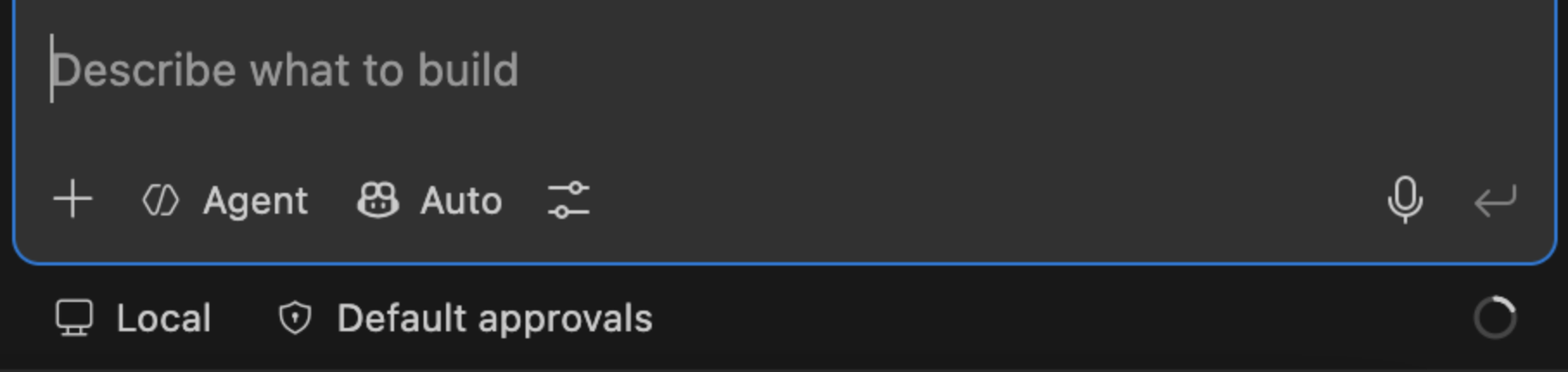
lamin track copilot says it can’t find the active session?
In VS Code, make sure “Copilot” is selected — not “Local” — in the mode picker below the chat input box. lamin track copilot can only see sessions that go through the “Copilot”; sessions run via “Local” aren’t visible to it.
Options:
lamin track [OPTIONS] COMMAND [ARGS]...

Options:
  --help  Show this message and exit.

Commands:
  agentcore  Start or resume tracking an AgentCore chat.
  claude     Start tracking a Claude Code session in LaminDB.
  codex      Start or resume tracking a Codex session in LaminDB.
  copilot    Start tracking a GitHub Copilot session in LaminDB.
  cursor     Start or resume tracking a Cursor IDE Agent session in LaminDB.
→ Python/R alternative: track() and finish() for (non-shell) scripts or notebooks
finish
Finish a tracked session.
This can be a shell script run, or a Claude Code, Copilot, Cursor, or Codex session.
Options:
lamin finish [OPTIONS]

Options:
  --help  Show this message and exit.
→ Python/R alternative: finish() for (non-shell) scripts or notebooks
Administer
settings
Manage development, cache, modules, branch, space, mount, and run settings.
Get or set the following settings:
dev-dir→ development directorydev_dircache-dir→ cache directorycache_dirmodules→ environment schema modulesmodulesbranch→ currentbranchspace→ currentspacemount→ read-only mounts of storage locations, used bylamin runto read inputs in placerun-where→ default place forlamin run(overridden by$LAMIN_RUN_WHEREand--where)run-access→ default access methods for inputs oflamin run(overridden by$LAMIN_RUN_ACCESSand--access)
You can display your current settings by running: lamin info
Examples:
# dev-dir (created by lamin init or lamin connect <account/name> --here)
lamin settings dev-dir get
lamin settings dev-dir find .
# cache-dir
lamin settings cache-dir get
lamin settings cache-dir set /path/to/cache
lamin settings cache-dir clear
# modules
lamin settings modules get
lamin settings modules set bionty,pertdb
lamin settings modules unset
# branch
lamin settings branch get
lamin settings branch set main
# space
lamin settings space get
lamin settings space set all
# mount
lamin settings mount storage ./mnt
lamin settings mount path lamin://acme/data/artifact/key/my_file.parquet
lamin settings mount unset ./mnt
# run-where
lamin settings run-where get
lamin settings run-where set modal
lamin settings run-where unset
# run-access
lamin settings run-access get
lamin settings run-access set mount,presigned,credentials
lamin settings run-access unset
Options:
lamin settings [OPTIONS] COMMAND [ARGS]...

Options:
  --help  Show this message and exit.

Commands:
  cache-dir   Get, set, reset, or clear the cache directory.
  dev-dir     Get or find development directories.
  modules     Get or set environment schema modules.
  mount       Mount storage locations read-only via an installed FUSE...
  run-access  Get or set how `lamin run` hands inputs to the target by...
  run-where   Get or set where `lamin run` runs by default.
→ Python/R alternative: dev_dir, cache_dir, modules, branch, and space
migrate
Manage database schema migrations.
Options:
lamin migrate [OPTIONS] COMMAND [ARGS]...

Options:
  --help  Show this message and exit.

Commands:
  create  Create a new migration.
  deploy  Deploy migrations.
  squash  Squash migrations.
io
Transfer, import, and export data.
Use lamin io sync to sync objects to the current database:
lamin io sync https://lamin.ai/laminlabs/lamindata/record/UrcIKR8v0ywim0pE
lamin io sync https://lamin.ai/laminlabs/lamindata/record/UrcIKR8v0ywim0pE --depth 1
lamin io sync record --uid UrcIKR8v0ywim0pE --from laminlabs/lamindata
lamin io sync artifact --key example_datasets/mini_immuno/dataset1.h5ad --from laminlabs/lamindata
→ Guide: Transfer & sync across databases
Options:
lamin io [OPTIONS] COMMAND [ARGS]...

Options:
  --help  Show this message and exit.

Commands:
  exportdb  Export registries to parquet files.
  importdb  Import registries from parquet files.
  snapshot  Create an SQLite snapshot of the current database.
  sync      Sync an object to the current database.
→ Python/R alternative: sync()
Use lamin io snapshot to create an SQLite snapshot of the current database:
lamin io snapshot
Use lamin io importdb to import data from parquet files:
lamin io importdb --input-dir path/to/parquet/files
Use lamin io exportdb to export data to parquet files:
lamin io exportdb --output-dir path/to/parquet/files
integrations
Use integrations.
Examples:
lamin integrations notion sync db7c1d2ec3a6495e859f8d21d533dd27
lamin integrations notion sync db7c1d2ec3a6495e859f8d21d533dd27 --depth 1 --space my-space --apply
Options:
lamin integrations [OPTIONS] COMMAND [ARGS]...

Options:
  --help  Show this message and exit.

Commands:
  notion  Sync from Notion.
→ Python/R alternative: sync_objects_from_notion()
Authenticate
login
Log into the hub.
lamin login prompts for your API key unless you set it via environment variable LAMIN_API_KEY.
You can create your API key in your hub account settings at lamin.ai/settings <https://lamin.ai/settings>__.
After authenticating once, you can re-authenticate and switch between accounts via lamin login myhandle.
Options:
lamin login [OPTIONS] [USER]

Options:
  --help  Show this message and exit.
→ Python/R alternative: login()
logout
Log out of the hub.
Options:
lamin logout [OPTIONS]

Options:
  --help  Show this message and exit.
Experimental
run
Run a script or executable, tracked as a run.
Arguments for the target go after --. Any lamin:// URI among them, or the
target itself, is replaced by a local path: read in place from a mounted storage
location if there is one (see lamin settings mount), otherwise from the cache.
lamin run train.py -- --data lamin://acme/data/artifact/key/train.parquet --epochs 3
lamin run samtools -- view -b lamin://acme/data/artifact/3TrLu3AbQx9dZq2K -o out.bam
lamin run --register-output out.bam align.sh -- --out out.bam
lamin run --where modal --project my_project my_script.py
lamin run --dry-run align.sh -- --out out.bam
--access lists, in order, which methods may hand an input to the target. Each
URI gets the first one that can serve it, and the log shows which one did and why
earlier ones could not:
mount: a path inside a mount of its storage location, or in local storagecache: a path in the cache, downloading the artifact if neededpresigned: a time-limited https URL (see--presign-expiry); files onlycredentials: the unsigned storage URL, e.g.s3://bucket/keyorgs://bucket/key, with credentials for the target:AWS_*variables (s3) or an access token inCLOUDSDK_AUTH_ACCESS_TOKENandGOOGLE_OAUTH_ACCESS_TOKEN(gs)
The default is mount,cache, so a target always gets local paths unless URLs are
allowed. If no allowed method can serve a URI, nothing runs and the error lists
why each failed. The list is as much about what to forbid as about order:
mount,presigned never downloads, mount,cache never hands out URLs. Set a
default with $LAMIN_RUN_ACCESS or lamin settings run-access.
A process holds one AWS identity and one GCS token, so credentials serves
inputs in argument order until one needs other credentials than an earlier one;
that input falls through to the next allowed method. Mounts and presigned URLs
carry per-location authorization, so allow one of them when inputs live in
storage locations with different credentials.
Environment variables are fixed when the target starts. For long runs on s3, pass
--credentials-via file: lamin writes an AWS credentials file, refreshes it from
LaminHub while the target runs, and points AWS_SHARED_CREDENTIALS_FILE at it,
which helps tools that re-read it. AWS SDKs (boto3, aws cli) cache what they
read, so use --credentials-via process for them instead: AWS_CONFIG_FILE then
names a profile whose credential_process runs lamin to fetch fresh credentials
whenever the SDK needs them. Tools with their own S3 client that read neither
need env, or a mount (lamin settings mount).
lamin run --access mount,presigned samtools -- view lamin://acme/data/artifact/key/a.bam
lamin run --access credentials aws -- s3 cp lamin://acme/data/artifact/3TrLu3AbQx9dZq2K -
lamin run --access mount,presigned,credentials,cache tool.sh -- lamin://... lamin://...
URIs take two forms. The uid form matches nf-lamin; the key form accepts
space, branch and version qualifiers:
lamin://<owner>/<instance>/artifact/<uid>[/<subpath>]
lamin://<owner>/<instance>/artifact/key/<key>[/<subpath>][?space=&branch=&version=]
Resolved artifacts are linked as run inputs. The target receives
LAMIN_INITIATED_BY_RUN_UID, so a script calling ln.track() records its run as
a child of this one, plus LAMIN_INPUT_PATHS and LAMIN_MOUNTS (JSON) to
translate URIs it reads from elsewhere, e.g. config files.
The target’s --version output, when it has one, is recorded in
run.params["tool_version"], not on its (possibly reused) transform. For a
Python script, the interpreter’s pip freeze is additionally snapshotted and
linked as run.environment, mirroring what ln.track() does for its own
process.
Unlike inputs, which carry their own ?branch=&space= in the URI, the
transform/run/outputs otherwise inherit whatever branch/space the local machine
is pointed at; pass --branch/--space to make this explicit instead.
An output only registers if the target exits 0, and is uploaded or kept local
following the instance’s keep_artifacts_local setting; pass --upload-outputs
to force it for this run. Use --dry-run to preview all of this first.
Options:
lamin run [OPTIONS] TARGET

Options:
  --where [local|modal]           Where to run. Defaults to $LAMIN_RUN_WHERE,
                                  then `lamin settings run-where`, then local.
  --project TEXT                  A valid project name or uid to link the run
                                  to. On Modal, also names the app.
  --register-output TEXT          Register a file the target writes as an
                                  output artifact. Repeatable.
  --access TEXT                   Ordered, comma-separated access methods for
                                  `lamin://` URIs in the arguments; each URI
                                  gets the first that can serve it: `mount`
                                  (path in a mount or local storage), `cache`
                                  (path in the cache, downloading),
                                  `presigned` (https URL), `credentials`
                                  (storage URL plus credentials). Defaults to
                                  $LAMIN_RUN_ACCESS, then `lamin settings run-
                                  access`, then mount,cache.
  --presign-expiry INTEGER RANGE  Seconds a presigned URL stays valid. Only
                                  when --access allows presigned.  [default:
                                  3600; x>=1]
  --credentials-via [env|file|process]
                                  How credentials reach the target when
                                  --access allows credentials: `env`
                                  (environment variables, fixed at launch),
                                  `file` (an AWS credentials file that lamin
                                  keeps fresh), `process` (an AWS config whose
                                  credential_process fetches fresh
                                  credentials; AWS SDKs only). Use file or
                                  process for long runs. s3 only for file and
                                  process.  [default: env]
  --remount                       Remount a storage location if it serves
                                  stale metadata for an input.
  --image-url TEXT                Modal only: a URL to the base docker image.
  --packages TEXT                 Modal only: a comma-separated list of
                                  additional packages.
  --cpu FLOAT                     Modal only: CPU configuration.
  --gpu TEXT                      Modal only: the type of GPU (cuda images
                                  only).
  --branch TEXT                   A branch name or uid for the transform, run
                                  and any outputs. Defaults to the current
                                  local branch.
  --space TEXT                    A space name or uid for the transform, run
                                  and any outputs. Defaults to the current
                                  local space.
  --upload-outputs                Force outputs to upload even if the instance
                                  keeps artifacts local by default.
  --dry-run                       Report what would be linked as inputs and
                                  registered as outputs, without executing the
                                  target or saving anything. Local only.
  --help                          Show this message and exit.
→ Python/R alternative: no equivalent
hub
Query the hub API.
This is an EXPERIMENTAL feature.
Options:
lamin hub [OPTIONS] COMMAND [ARGS]...

Options:
  --help  Show this message and exit.

Metadata:
  schema      Show instance schema.
  statistics  Show size and table counts.

Reads:
  list  List objects.
  get   Get one object.

Mutations:
  insert  Insert objects.
  upsert  Insert or update objects.
  update  Update objects.
  delete  Delete objects.