RxRx 
 

rxrx.ai hosts high-throughput cell imaging datasets generated by Recursion.
High numbers of fluorescent microscopy images characterize cellular phenotypes in vitro based on morphology and protein expression (5-10 stains) across a range of conditions.
In this guide, you’ll see how to query some of these data using LaminDB. If you’d like to sync data into your own LaminDB instance, see the transfer guide.
# pip install 'lamindb[gcp]' duckdb
lamin init --modules bionty,pertdb --storage ./test-rxrx
Show code cell output
→ dev-dir is: /home/runner/work/lamin-spatial/lamin-spatial/docs
→ initialized lamindb: testuser1/test-rxrx
import lamindb as ln
Show code cell output
→ connected lamindb: testuser1/test-rxrx
Create the central query object for this instance:
db = ln.DB("laminlabs/lamindata")
Show code cell output
! database has module pertdb, configure it: lamin settings modules set bionty,pertdb
Search & look up metadata
We’ll find all genetic treatments in the GeneticPerturbation registry:
df = db.pertdb.GeneticPerturbation.to_dataframe()
df.shape
Show code cell output
(8, 17)
Let us create a look up object for siRNAs so that we can easily auto-complete queries involving it:
sirnas = db.pertdb.GeneticPerturbation.filter(type="siRNA").lookup(return_field="name")
We’re also interested in cell lines:
cell_lines = db.bionty.CellLine.lookup(return_field="abbr")
Load the collection
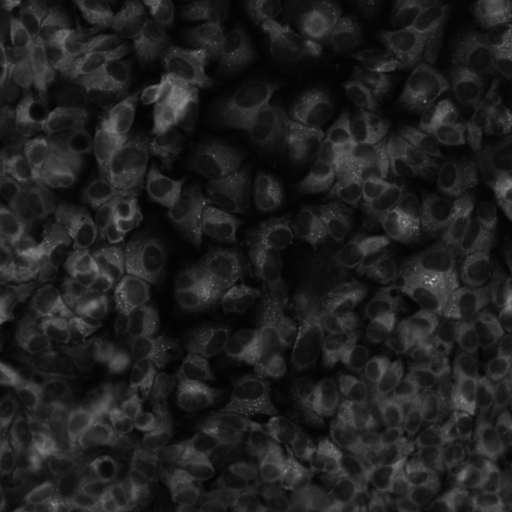
This is RxRx1: 125k images for 1138 siRNA perturbation across 4 cell lines reading out 5 stains, image dimension is 512x512x6.
Let us get the corresponding object and some information about it:
collection = db.Collection.get("Br2Z1lVSQBAkkbbt7ILu")
collection.view_lineage()
collection.describe()
Show code cell output
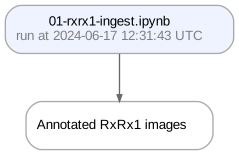
Collection: Annotated RxRx1 images (1)
└── uid: Br2Z1lVSQBAkkbbt7ILu            run: Cn8PVyb (01-rxrx1-ingest.ipynb)
    branch: main                         space: all
    created_at: 2024-06-17 12:43:02 UTC  created_by: sunnyosun
The dataset consists in a metadata file and a folder path pointing to the image files:
collection.meta_artifact.load().head()
Show code cell output
! run input wasn't tracked, call `ln.track()` and re-run
| site_id | well_id | cell_line | split | experiment | plate | well | site | well_type | sirna | sirna_id | path | |
|---|---|---|---|---|---|---|---|---|---|---|---|---|
| 0 | HEPG2-08_1_B02_1 | HEPG2-08_1_B02 | HEPG2 | test | HEPG2-08 | 1 | B02 | 1 | negative_control | EMPTY | 1138 | images/test/HEPG2-08/Plate1/B02_s1_w1.png |
| 1 | HEPG2-08_1_B02_1 | HEPG2-08_1_B02 | HEPG2 | test | HEPG2-08 | 1 | B02 | 1 | negative_control | EMPTY | 1138 | images/test/HEPG2-08/Plate1/B02_s1_w2.png |
| 2 | HEPG2-08_1_B02_1 | HEPG2-08_1_B02 | HEPG2 | test | HEPG2-08 | 1 | B02 | 1 | negative_control | EMPTY | 1138 | images/test/HEPG2-08/Plate1/B02_s1_w3.png |
| 3 | HEPG2-08_1_B02_1 | HEPG2-08_1_B02 | HEPG2 | test | HEPG2-08 | 1 | B02 | 1 | negative_control | EMPTY | 1138 | images/test/HEPG2-08/Plate1/B02_s1_w4.png |
| 4 | HEPG2-08_1_B02_1 | HEPG2-08_1_B02 | HEPG2 | test | HEPG2-08 | 1 | B02 | 1 | negative_control | EMPTY | 1138 | images/test/HEPG2-08/Plate1/B02_s1_w5.png |
Query image files
Because we didn’t choose to register each image as a record in the Artifact registry, we have to query the images through the metadata file of the dataset:
df = collection.meta_artifact.load()
Show code cell output
! run input wasn't tracked, call `ln.track()` and re-run
We can query a subset of images using metadata registries & pandas query syntax:
query = df[(df.cell_line == cell_lines.hep_g2_cell) & (df.plate == 1) & (df.site == 2)]
query
Show code cell output
| site_id | well_id | cell_line | split | experiment | plate | well | site | well_type | sirna | sirna_id | path | |
|---|---|---|---|---|---|---|---|---|---|---|---|---|
| 6 | HEPG2-08_1_B02_2 | HEPG2-08_1_B02 | HEPG2 | test | HEPG2-08 | 1 | B02 | 2 | negative_control | EMPTY | 1138 | images/test/HEPG2-08/Plate1/B02_s2_w1.png |
| 7 | HEPG2-08_1_B02_2 | HEPG2-08_1_B02 | HEPG2 | test | HEPG2-08 | 1 | B02 | 2 | negative_control | EMPTY | 1138 | images/test/HEPG2-08/Plate1/B02_s2_w2.png |
| 8 | HEPG2-08_1_B02_2 | HEPG2-08_1_B02 | HEPG2 | test | HEPG2-08 | 1 | B02 | 2 | negative_control | EMPTY | 1138 | images/test/HEPG2-08/Plate1/B02_s2_w3.png |
| 9 | HEPG2-08_1_B02_2 | HEPG2-08_1_B02 | HEPG2 | test | HEPG2-08 | 1 | B02 | 2 | negative_control | EMPTY | 1138 | images/test/HEPG2-08/Plate1/B02_s2_w4.png |
| 10 | HEPG2-08_1_B02_2 | HEPG2-08_1_B02 | HEPG2 | test | HEPG2-08 | 1 | B02 | 2 | negative_control | EMPTY | 1138 | images/test/HEPG2-08/Plate1/B02_s2_w5.png |
| ... | ... | ... | ... | ... | ... | ... | ... | ... | ... | ... | ... | ... |
| 358111 | HEPG2-07_1_O23_2 | HEPG2-07_1_O23 | HEPG2 | train | HEPG2-07 | 1 | O23 | 2 | treatment | s27411 | 489 | images/train/HEPG2-07/Plate1/O23_s2_w2.png |
| 358112 | HEPG2-07_1_O23_2 | HEPG2-07_1_O23 | HEPG2 | train | HEPG2-07 | 1 | O23 | 2 | treatment | s27411 | 489 | images/train/HEPG2-07/Plate1/O23_s2_w3.png |
| 358113 | HEPG2-07_1_O23_2 | HEPG2-07_1_O23 | HEPG2 | train | HEPG2-07 | 1 | O23 | 2 | treatment | s27411 | 489 | images/train/HEPG2-07/Plate1/O23_s2_w4.png |
| 358114 | HEPG2-07_1_O23_2 | HEPG2-07_1_O23 | HEPG2 | train | HEPG2-07 | 1 | O23 | 2 | treatment | s27411 | 489 | images/train/HEPG2-07/Plate1/O23_s2_w5.png |
| 358115 | HEPG2-07_1_O23_2 | HEPG2-07_1_O23 | HEPG2 | train | HEPG2-07 | 1 | O23 | 2 | treatment | s27411 | 489 | images/train/HEPG2-07/Plate1/O23_s2_w6.png |
20328 rows × 12 columns
To access the individual images based on this query result:
collection.data_artifact.storage.root
Show code cell output
'gs://rxrx1-europe-west4'
images = [f"{collection.data_artifact.storage.root}/{key}" for key in query.path]
images
Download an image to disk:
from IPython.display import Image

path = ln.UPath(images[1])
path.download_to(".")

Image(f"./{path.name}")
Use DuckDB to query metadata
As an alternative to pandas, we could use DuckDB to query image metadata.
import duckdb

features = db.Feature.lookup(return_field="name")

filter = (
    f"{features.cell_line} == '{cell_lines.hep_g2_cell}' and "
    f"{features.plate} == '1' and {features.site} == '2'"
)

parquet_data = duckdb.from_parquet(
    collection.meta_artifact.path.as_posix() + "?s3_region=us-east-1"
)

parquet_data.filter(filter)
Show code cell output
┌──────────────────┬────────────────┬───────────┬─────────┬────────────┬───────┬─────────┬───────┬──────────────────┬─────────┬──────────┬────────────────────────────────────────────┐
│     site_id      │    well_id     │ cell_line │  split  │ experiment │ plate │  well   │ site  │    well_type     │  sirna  │ sirna_id │                    path                    │
│     varchar      │    varchar     │  varchar  │ varchar │  varchar   │ int64 │ varchar │ int64 │     varchar      │ varchar │  int64   │                  varchar                   │
├──────────────────┼────────────────┼───────────┼─────────┼────────────┼───────┼─────────┼───────┼──────────────────┼─────────┼──────────┼────────────────────────────────────────────┤
│ HEPG2-08_1_B02_2 │ HEPG2-08_1_B02 │ HEPG2     │ test    │ HEPG2-08   │     1 │ B02     │     2 │ negative_control │ EMPTY   │     1138 │ images/test/HEPG2-08/Plate1/B02_s2_w1.png  │
│ HEPG2-08_1_B02_2 │ HEPG2-08_1_B02 │ HEPG2     │ test    │ HEPG2-08   │     1 │ B02     │     2 │ negative_control │ EMPTY   │     1138 │ images/test/HEPG2-08/Plate1/B02_s2_w2.png  │
│ HEPG2-08_1_B02_2 │ HEPG2-08_1_B02 │ HEPG2     │ test    │ HEPG2-08   │     1 │ B02     │     2 │ negative_control │ EMPTY   │     1138 │ images/test/HEPG2-08/Plate1/B02_s2_w3.png  │
│ HEPG2-08_1_B02_2 │ HEPG2-08_1_B02 │ HEPG2     │ test    │ HEPG2-08   │     1 │ B02     │     2 │ negative_control │ EMPTY   │     1138 │ images/test/HEPG2-08/Plate1/B02_s2_w4.png  │
│ HEPG2-08_1_B02_2 │ HEPG2-08_1_B02 │ HEPG2     │ test    │ HEPG2-08   │     1 │ B02     │     2 │ negative_control │ EMPTY   │     1138 │ images/test/HEPG2-08/Plate1/B02_s2_w5.png  │
│ HEPG2-08_1_B02_2 │ HEPG2-08_1_B02 │ HEPG2     │ test    │ HEPG2-08   │     1 │ B02     │     2 │ negative_control │ EMPTY   │     1138 │ images/test/HEPG2-08/Plate1/B02_s2_w6.png  │
│ HEPG2-08_1_B03_2 │ HEPG2-08_1_B03 │ HEPG2     │ test    │ HEPG2-08   │     1 │ B03     │     2 │ treatment        │ s21721  │      855 │ images/test/HEPG2-08/Plate1/B03_s2_w1.png  │
│ HEPG2-08_1_B03_2 │ HEPG2-08_1_B03 │ HEPG2     │ test    │ HEPG2-08   │     1 │ B03     │     2 │ treatment        │ s21721  │      855 │ images/test/HEPG2-08/Plate1/B03_s2_w2.png  │
│ HEPG2-08_1_B03_2 │ HEPG2-08_1_B03 │ HEPG2     │ test    │ HEPG2-08   │     1 │ B03     │     2 │ treatment        │ s21721  │      855 │ images/test/HEPG2-08/Plate1/B03_s2_w3.png  │
│ HEPG2-08_1_B03_2 │ HEPG2-08_1_B03 │ HEPG2     │ test    │ HEPG2-08   │     1 │ B03     │     2 │ treatment        │ s21721  │      855 │ images/test/HEPG2-08/Plate1/B03_s2_w4.png  │
│        ·         │       ·        │   ·       │  ·      │    ·       │     · │  ·      │     · │     ·            │   ·     │        · │                     ·                      │
│        ·         │       ·        │   ·       │  ·      │    ·       │     · │  ·      │     · │     ·            │   ·     │        · │                     ·                      │
│        ·         │       ·        │   ·       │  ·      │    ·       │     · │  ·      │     · │     ·            │   ·     │        · │                     ·                      │
│ HEPG2-02_1_G17_2 │ HEPG2-02_1_G17 │ HEPG2     │ train   │ HEPG2-02   │     1 │ G17     │     2 │ treatment        │ s27876  │        3 │ images/train/HEPG2-02/Plate1/G17_s2_w1.png │
│ HEPG2-02_1_G17_2 │ HEPG2-02_1_G17 │ HEPG2     │ train   │ HEPG2-02   │     1 │ G17     │     2 │ treatment        │ s27876  │        3 │ images/train/HEPG2-02/Plate1/G17_s2_w2.png │
│ HEPG2-02_1_G17_2 │ HEPG2-02_1_G17 │ HEPG2     │ train   │ HEPG2-02   │     1 │ G17     │     2 │ treatment        │ s27876  │        3 │ images/train/HEPG2-02/Plate1/G17_s2_w3.png │
│ HEPG2-02_1_G17_2 │ HEPG2-02_1_G17 │ HEPG2     │ train   │ HEPG2-02   │     1 │ G17     │     2 │ treatment        │ s27876  │        3 │ images/train/HEPG2-02/Plate1/G17_s2_w4.png │
│ HEPG2-02_1_G17_2 │ HEPG2-02_1_G17 │ HEPG2     │ train   │ HEPG2-02   │     1 │ G17     │     2 │ treatment        │ s27876  │        3 │ images/train/HEPG2-02/Plate1/G17_s2_w5.png │
│ HEPG2-02_1_G17_2 │ HEPG2-02_1_G17 │ HEPG2     │ train   │ HEPG2-02   │     1 │ G17     │     2 │ treatment        │ s27876  │        3 │ images/train/HEPG2-02/Plate1/G17_s2_w6.png │
│ HEPG2-02_1_G18_2 │ HEPG2-02_1_G18 │ HEPG2     │ train   │ HEPG2-02   │     1 │ G18     │     2 │ treatment        │ s27646  │      124 │ images/train/HEPG2-02/Plate1/G18_s2_w1.png │
│ HEPG2-02_1_G18_2 │ HEPG2-02_1_G18 │ HEPG2     │ train   │ HEPG2-02   │     1 │ G18     │     2 │ treatment        │ s27646  │      124 │ images/train/HEPG2-02/Plate1/G18_s2_w2.png │
│ HEPG2-02_1_G18_2 │ HEPG2-02_1_G18 │ HEPG2     │ train   │ HEPG2-02   │     1 │ G18     │     2 │ treatment        │ s27646  │      124 │ images/train/HEPG2-02/Plate1/G18_s2_w3.png │
│ HEPG2-02_1_G18_2 │ HEPG2-02_1_G18 │ HEPG2     │ train   │ HEPG2-02   │     1 │ G18     │     2 │ treatment        │ s27646  │      124 │ images/train/HEPG2-02/Plate1/G18_s2_w4.png │
└──────────────────┴────────────────┴───────────┴─────────┴────────────┴───────┴─────────┴───────┴──────────────────┴─────────┴──────────┴────────────────────────────────────────────┘
  ? rows (>9999 rows, 20 shown)                                                                                                                                            12 columns